
Założenia wstępne
Brak dostępu do zasobów domeny netapps.ovh i subdomen netapps.ovh z zewnątrz
Zakupiona w OVH domena netapps.ovh ma służyć 2 głównym celom. Obsłudze poczty na zewnętrznym serwerze OVH dla powiadomień systemowych oraz używaniu wszędzie gdzie się da nazw domenowych nazwa_hosta.netapps.ovh w sieci wewnętrznej oraz dostępu do wszelkich usług po https. W zależności od potrzeb można jednak pewne subdomeny np. test.netapps.ovh odkrywać / ukrywać dla zewnętrznego dostępu w panelu zarządzania domeną OVH i włączać przekierowanie rekordu typu A na adres domowy. Jednak ja postanowiłem że wszelkie usługi z zewnątrz są dostępne jedynie po VPN i wystarczy, że mój lokalny serwer DNS oparty na Mikrotik ma wpisy statyczne w konfiguracji DNS typu test.netapps.ovh – 192.168.8.xx.
Certyfikat SSL Let’encrypt typu wildcard ma być automatycznie odnawiany przez certbota
Certyfikat SSL Let’encrypt typu wildcard ma być automatycznie odnawiany przez certbota zainstalowanego w lekkim kontenerze LXC bez wskazywań typu rekord A i CNAME w strefie domeny netapps.ovh na mój internetowy adres domowy. Weryfikacja odbywa się jedynie na podstawie wygenerowanego tokena w OVH.
Dystrybucja w sieci odnowionego certryfikatu SSL Let’s encrypt ma odbywać się pół automatycznie
Monitoring Uptime kuma oraz Icinga 2 będą pilnować momentu kiedy zbliża się wygasanie certyfikatu SSL na wszystkich serwerach i usługach. Kopiowanie, restart usług, weryfikacja działania odnowionego certyfikatu ma odbywać się przez automatyczne skrypty Bash oraz ręczne playbooki Ansible.
Konfiguracja kontenera LXC z systemem Ubuntu 22.04
więcej informacji na temat kontenerów LXC w Proxmox można znaleźć tutaj Proxmox VE – zarządzanie kontenerami LXC – IT Admin (vblog.ovh)
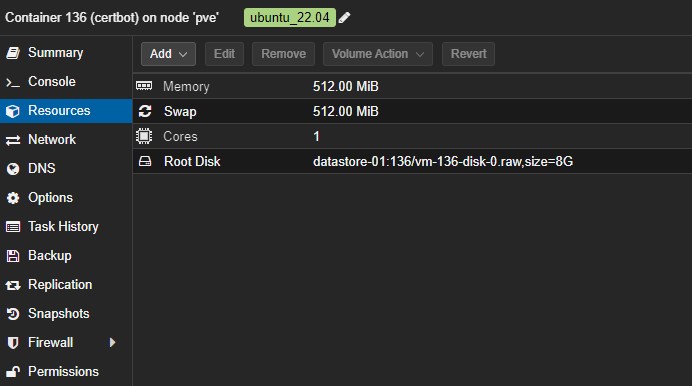
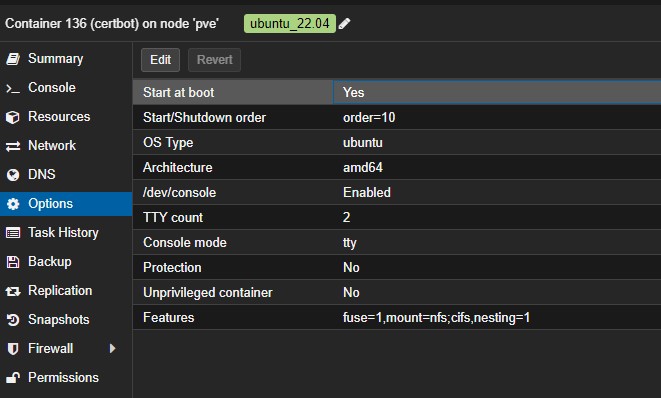
Instalacja certbot z wtyczką dla domeny w OVH
sudo apt install python3-certbot-dns-ovh

# weryfikacja czy wtyczka do certbot dla ovh została zainstalowana
certbot plugins
Saving debug log to /var/log/letsencrypt/letsencrypt.log

- - - - - - - - - - - - - - - - - - - - - - - - - - - - - - - - - - - - - - - -
* dns-ovh
Description: Obtain certificates using a DNS TXT record (if you are using OVH
for DNS).
Interfaces: Authenticator, Plugin
Entry point: dns-ovh = certbot_dns_ovh._internal.dns_ovh:Authenticator

* standalone
Description: Spin up a temporary webserver
Interfaces: Authenticator, Plugin
Entry point: standalone = certbot._internal.plugins.standalone:Authenticator

* webroot
Description: Place files in webroot directory
Interfaces: Authenticator, Plugin
Entry point: webroot = certbot._internal.plugins.webroot:Authenticator
- - - - - - - - - - - - - - - - - - - - - - - - - - - - - - - - - - - - - - - -
Wygenerowanie tokena do obsługi domeny w OVH z poziomu certbot
Sprawdzenie uprawnień do API na stronie https://api.ovh.com/console/
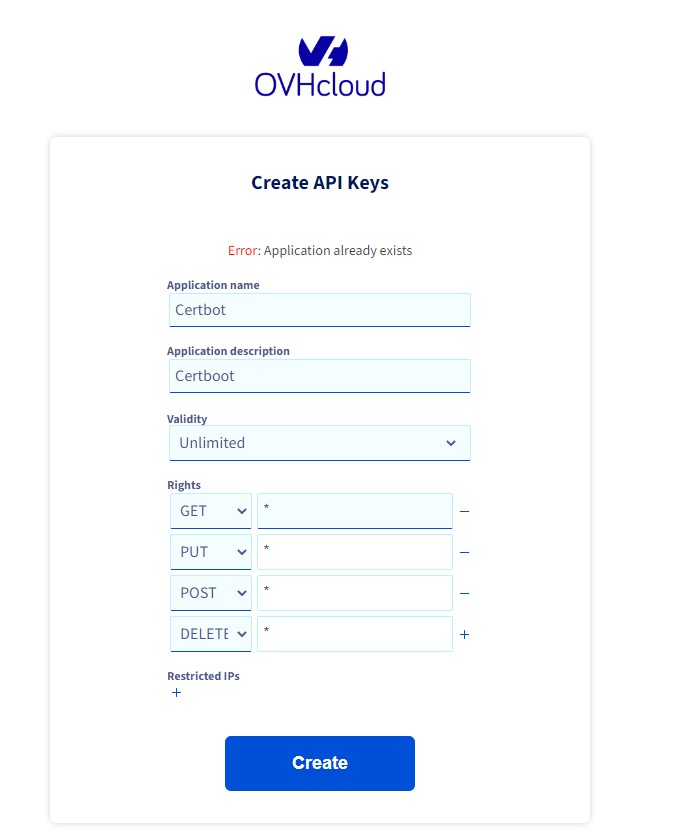
Wygenerowanie nowych uprawnień do API OVH na stronie https://www.ovh.com/auth/api/createToken
Dla wszystkich metod dostępu GET, PUT, POST, DELETE generujemy uprawnienia typu *. Możemy w Restricetd IPs wskazać numer ip skąd dozwolone będą zmiany lub odczyt przez API OVH. Zapisujemy wygenerowane informacje i wpisujemy je do pliku /root/certbot/ovh.ini
sudo nano /root/certbot/ovh.ini

# OVH API credentials used by Certbot
dns_ovh_endpoint = ovh-eu
dns_ovh_application_key = 7d3XXXXXXXXXX
dns_ovh_application_secret = 2e7b6dxxxxxxxxxxxxxxxxxxxxx
dns_ovh_consumer_key = e5cb8xxxxxxxxxxxxxxxxxxxxxxxx

sudo chmod 600 /root/certbot/ovh.ini
Możemy sprawdzić czy wpisane dane do API są poprawne używając przykładowego skryptu https://itadmin.vblog.ovh/skrypt-bash-check_api_ovh-sh/
Wygenerowanie certyfikatu Let’s Encrypt dla przykładowej domeny w OVH
certbot certonly --dns-ovh --dns-ovh-credentials /root/certbot/ovh.ini --dns-ovh-propagation-seconds 60 -d '*.netapps.ovh'

Saving debug log to /var/log/letsencrypt/letsencrypt.log
Enter email address (used for urgent renewal and security notices)
 (Enter 'c' to cancel): [email protected]

- - - - - - - - - - - - - - - - - - - - - - - - - - - - - - - - - - - - - - - -
Please read the Terms of Service at
https://letsencrypt.org/documents/LE-SA-v1.3-September-21-2022.pdf. You must
agree in order to register with the ACME server. Do you agree?
- - - - - - - - - - - - - - - - - - - - - - - - - - - - - - - - - - - - - - - -
(Y)es/(N)o: y

- - - - - - - - - - - - - - - - - - - - - - - - - - - - - - - - - - - - - - - -
Would you be willing, once your first certificate is successfully issued, to
share your email address with the Electronic Frontier Foundation, a founding
partner of the Let's Encrypt project and the non-profit organization that
develops Certbot? We'd like to send you email about our work encrypting the web,
EFF news, campaigns, and ways to support digital freedom.
- - - - - - - - - - - - - - - - - - - - - - - - - - - - - - - - - - - - - - - -
(Y)es/(N)o: n
Account registered.
Requesting a certificate for *.netapps.ovh
Unsafe permissions on credentials configuration file: /root/certbot/ovh.ini
Waiting 60 seconds for DNS changes to propagate

Successfully received certificate.
Certificate is saved at: /etc/letsencrypt/live/netapps.ovh/fullchain.pem
Key is saved at:         /etc/letsencrypt/live/netapps.ovh/privkey.pem
This certificate expires on 2023-02-07.
These files will be updated when the certificate renews.
Certbot has set up a scheduled task to automatically renew this certificate in the background.

- - - - - - - - - - - - - - - - - - - - - - - - - - - - - - - - - - - - - - - -
If you like Certbot, please consider supporting our work by:
 * Donating to ISRG / Let's Encrypt:   https://letsencrypt.org/donate
 * Donating to EFF:                    https://eff.org/donate-le
- - - - - - - - - - - - - - - - - - - - - - - - - - - - - - - - - - - - - - - -
Sprawdzenie czy certbot odnawia certyfikat Let’s encrypt automatycznie
systemctl list-timers
NEXT                         LEFT           LAST                         PASSED       UNIT                         ACTIVATES
Fri 2023-05-26 13:19:22 CEST 53min left     Fri 2023-05-26 06:27:13 CEST 5h 59min ago ua-timer.timer               ua-timer.service
Fri 2023-05-26 17:57:43 CEST 5h 31min left  Fri 2023-05-26 10:07:19 CEST 2h 18min ago certbot.timer                certbot.service
Fri 2023-05-26 18:02:12 CEST 5h 35min left  Fri 2023-05-26 11:47:20 CEST 38min ago    apt-daily.timer              apt-daily.service
Fri 2023-05-26 20:02:18 CEST 7h left        Fri 2023-05-26 06:25:37 CEST 6h ago       motd-news.timer              motd-news.service
Sat 2023-05-27 00:00:00 CEST 11h left       n/a                          n/a          dpkg-db-backup.timer         dpkg-db-backup.service
Sat 2023-05-27 00:00:00 CEST 11h left       Fri 2023-05-26 00:00:02 CEST 12h ago      logrotate.timer              logrotate.service
Sat 2023-05-27 01:55:52 CEST 13h left       Fri 2023-05-26 09:41:11 CEST 2h 45min ago man-db.timer                 man-db.service
Sat 2023-05-27 06:26:52 CEST 18h left       Fri 2023-05-26 06:26:52 CEST 5h 59min ago systemd-tmpfiles-clean.timer systemd-tmpfiles-clean.service
Sat 2023-05-27 06:50:43 CEST 18h left       Fri 2023-05-26 06:00:44 CEST 6h ago       apt-daily-upgrade.timer      apt-daily-upgrade.service
Sun 2023-05-28 03:10:10 CEST 1 day 14h left Mon 2023-05-22 13:24:09 CEST 3 days ago   e2scrub_all.timer            e2scrub_all.service

10 timers listed.
Pass --all to see loaded but inactive timers, too.
Sprawdzenie konfiguracji usługi cron dla certbota
nano /etc/cron.d/certbot

SHELL=/bin/sh
PATH=/usr/local/sbin:/usr/local/bin:/sbin:/bin:/usr/sbin:/usr/bin

0 */12 * * * root test -x /usr/bin/certbot -a \! -d /run/systemd/system && perl -e 'sleep int(rand(43200))' && certbot -q renew
Ręczne wymuszenie odnowienia certyfikatu SSL Let’s encrypt
certbot renew --force-renewal

Saving debug log to /var/log/letsencrypt/letsencrypt.log
Processing /etc/letsencrypt/renewal/netapps.ovh.conf
Renewing an existing certificate for *.netapps.ovh
Congratulations, all renewals succeeded:
/etc/letsencrypt/live/netapps.ovh/fullchain.pem (success)
Weryfikacja ważności certyfikatów SSL Let’s encrypt
# weryfikacja ważności pliku certyfikatu SSL
openssl x509 -enddate -noout -in /etc/letsencrypt/live/netapps.ovh/cert.pem | awk -F '=' '{print $2}'

Aug 21 03:34:50 2023 GMT

# weryfikacja ważności certyfikatu SSL dla konkretnego adresu w sieci
echo | openssl s_client -servername cloud.netapps.ovh -connect cloud.netapps.ovh:443 | openssl x509 -noout -dates | grep "notAfter"

depth=2 C = US, O = Internet Security Research Group, CN = ISRG Root X1
verify return:1
depth=1 C = US, O = Let's Encrypt, CN = R3
verify return:1
depth=0 CN = *.netapps.ovh
verify return:1
notAfter=Jun 20 10:04:23 2023 GMT
DONE
Zawartość plików certyfikatu SSL Let’s encrypt
W katalogu /etc/letsencrypt/live/netapps.ovh/ znajdują się 4 pliki (dowiązania symboliczne do aktualnych plików certyfikatu):
cert.pem – klucz publiczny
chain.pem– zawiera certyfikat pośredni, certyfikat z Let’s Encrypt zawierający klucz publiczny, który jest „powiązany” z kluczem prywatnym, którym podpisano twój certyfikat. Ten pośredni certyfikat jest wymagany, aby klienci mogli zweryfikować Twój certyfikat
fullchain.pem – to połączenie cert.pem i chain.pem
privkey.pem – klucz prywatny
W celu instalacji na serwerach certyfikatu SSL wykorzystuje się najczęściej 2 pliki: privkey.pem oraz fullchain.pem